Move faster with AI filtering and flexible branding

With new AI-powered filtering, you can find the right participants in seconds just by describing who you need. We’ve also added more flexibility across Rally, from fully custom branded emails to a richer content editor, so your team can work more efficiently without sacrificing control or quality.
Watch this 2 minute overview:
Find participants fast with AI filtering!
Researchers can now find the right participants by describing who they’re looking for in plain English, rather than manually configuring filters one by one.
For example, typing “B2B SaaS, manager or above, based in North America” will automatically generate the correct filters in the All People participant CRM.
This makes recruiting faster for experienced researchers and accessible to team members who aren’t familiar with a workspace’s full property structure.

Not ready to use Rally’s AI features quite yet?
We've added a new AI Features toggle in Settings. Because we know some organizations need to complete a security review before enabling AI capabilities, this toggle gives you full control.
It's on by default, so if you need to turn it off while your team completes a review, just head to Settings to do so.
We have more AI features planned for Rally throughout 2026, and this toggle ensures you're always in the driver's seat.
A few helpful links:
Note: Rally will never use your data to train AI models. Your data remains yours at all times, and our use of AI is governed by the policies linked above.

Create Custom Branded HTML Emails
Admins can now upload a fully custom HTML email template to any Brand in Rally. When an HTML email template is set for a brand, all outbound emails sent under that brand (including automated emails like consent form notifications and reminders) will use the custom HTML layout instead of Rally’s default.
This gives teams with strict brand or compliance requirements complete control over how Rally’s emails look to participants and stakeholders. Set up custom branded HTML email templates in Templates > Emails.

Track participants from Rally in Maze studies
When customers use Maze for unmoderated tests as part of a Rally study, participants are now automatically redirected back to Rally when they finish the test. The auto redirect removes any drop-off friction and keeps participants moving through the study without interruption.
Lock down elements of study templates
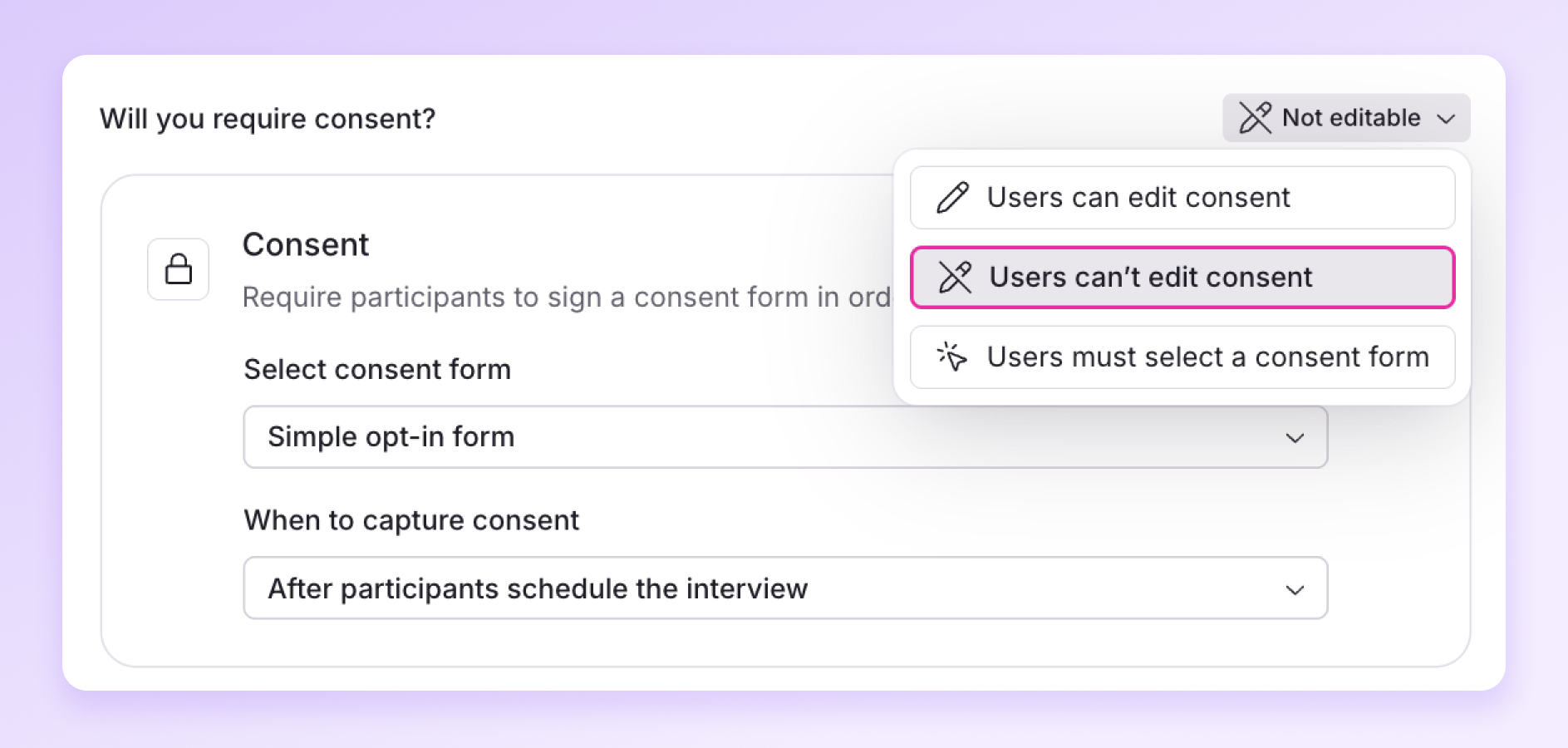
Admins can now lock specific elements of a study template, including screener questions, consent forms, incentives, participant limit, and interview duration, so that anyone building a study from that template can't change what's been locked down. This gives research ops teams a reliable way to enforce standards across their programs without relying on researchers to remember the rules.
Before publishing a template, admins can preview it exactly as a researcher would, confirming which elements are locked and testing screener logic, consent requirements, incentives, and custom emails end-to-end. A separate override permission can be enabled for specific users who need the flexibility to edit locked items on a per-study basis without having to modify the template itself.
Read more here.
Edit text, resize images, and insert content blocks quickly
Researchers can now write richer, better-formatted content across all study messages including welcome pages, screener completed messages, and scheduler messages. The rebuilt editor supports inline image resizing, a / shortcut to quickly insert content blocks (text, quotes, images), and a full formatting toolbar.

Give Consent Forms a description
Admins can now add descriptions to consent form templates, making it easier to choose the right one for each study.
When setting up a study, researchers can see these descriptions directly in the consent form selector so they don’t have to open each form to understand its purpose. This is especially helpful for teams managing multiple consent forms, reducing confusion and the risk of selecting the wrong one.

- Snowflake authentication update: Rally’s Snowflake integration now uses Personal Access Token (PAT) authentication instead of OAuth username and password credentials, making the connection more secure and less prone to breaking when credentials change.
- Admins can update any user’s display name in Settings: useful when a team member signs up with a typo or incorrect name.