MCP for Research: A Field Guide for Product Builders
Read this blog post for a practical guide on how to use the Rally MCP for every stage of product building.
Every time you jumped on a call with a churned customer to understand why they left - that was research. Every time you dropped a Figma prototype into Slack to get reactions before a sprint review - that was research. Every time you read through support tickets to figure out what was actually happening versus what you assumed - that was research.
You've been building with users in mind this whole time. The instinct is already there. What this guide gives you is the system to match it - so the insights you work hard to gather actually stick, compound, and change how your team builds.
This field guide walks you through how to run research well, from forming a question to sharing findings, as a product builder working inside a real organization with real constraints. The practices here are designed to work with your org's research infrastructure, not around it - because when those two things align, everyone's research gets better.
Before you start: always run this check first
Before setting up any new study, search what your organization already knows. Check your research repository for prior findings on your topic. Check whether someone is currently running a study that touches the same question.
This check also protects something valuable: your pool of customers. When multiple teams are conducting their own research, it's easy to lose track of who's contacted whom, leading to irritated customers and participant fatigue. A quick check at the start is a small habit that keeps your organization's relationships with users healthy for everyone.
Using Rally MCP
"Search all past research for findings related to [topic or feature area]. What has our team already learned about this?"
"Are there any active studies currently running that touch on [user segment, behavior or workflow]?"
What comes back will often reshape how you frame the study - and occasionally tell you that you don't need to run one at all, which is a win too.
Stage 1: Form the right question
Forming a sharp research question is a skill, and most researchers - dedicated or otherwise - had to develop it over time. If your first attempt is fuzzy, that's not a problem. It's the process.
User research is only as useful as the clarity behind it. Before running a single interview or usability test, product builders need to define what they are trying to learn. Objectives give user research its direction and make the findings actionable rather than just interesting.
Before you write a discussion guide or launch a screener, write down clear answers to these three things:
- The decision: What will change based on what we learn?
- The assumption: What do we currently believe is true, and why might we be wrong?
- The question: What specifically do we need to understand to make actionable decisions?
If you can answer all three concretely, you're ready to move forward. If the question still feels vague, that's a useful signal - spending another hour here will save you significantly more time later. And when you do have your question, scope it tight.
Using Rally MCP
"I'm trying to understand [rough question]. Help me sharpen this into a specific, answerable research question and write a short research brief - including the decision it maps to, what we're assuming, recommended methodology, and participant criteria."
The brief gives you something concrete to align stakeholders around before a single participant is contacted - and creates a record of why the study was run that becomes useful context six months from now.
Stage 2: Choose the right method
The good news: you probably already have decent instincts about which method fits which situation. This section gives you the language to make those instincts more precise.
Use interviews when you need to understand the why behind a behavior - the context, the workarounds, the mental models. Interviews are generative: best for discovery and understanding problem spaces. They're not great for measuring things or understanding what users do versus what they say they do.
Use usability testing when you have something to put in front of a user and need to know whether it works. Usability testing is evaluative: it tells you where people get stuck and whether the design matches how users actually think about the task. For most product builders, this is the most immediately actionable method - you watch someone struggle at a specific step, you fix that step.
Use surveys when you need to measure something across a larger group than interviews can reach. Surveys are good for quantifying what you already qualitatively understand. Use them to validate and measure, not to explore.
Use concept testing when you're validating a direction before committing engineering resources. Show users two or three approaches and determine which better fits how they think about the task. When teams have clear user research data, prioritization becomes a structured conversation rather than a political one. Features tied to real user pain points rise to the top. Work that serves internal preferences without user validation gets scrutinized.
Using Rally MCP
"I'm trying to [research goal]. My timeline is [X weeks] and I have capacity for [N] sessions. What method would you recommend and why?"
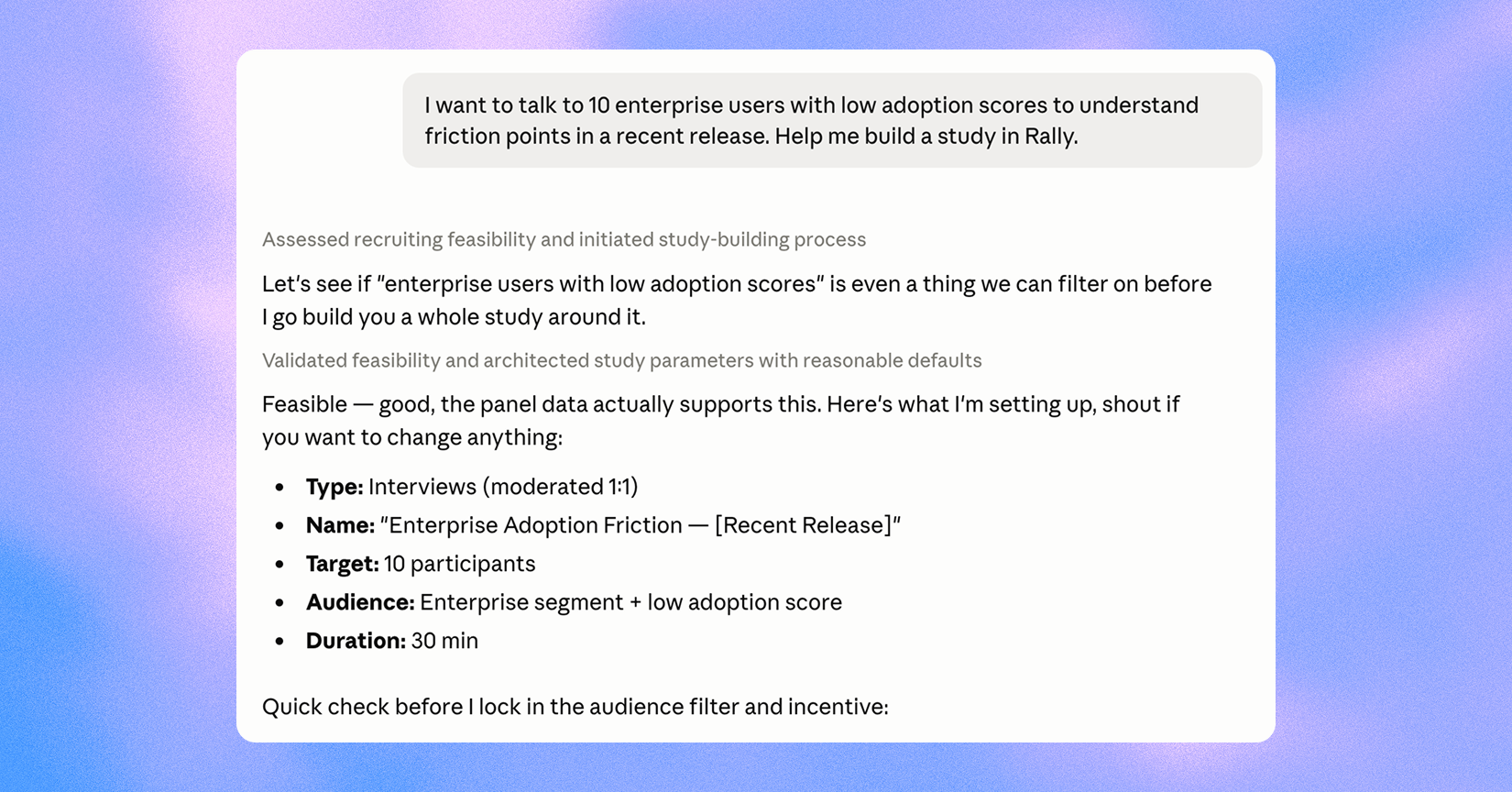
"Set up a [moderated interview / unmoderated usability test / survey] study in Rally. The research question is [question]. Sessions should be [X] minutes, targeting [N] participants."
Stage 3: Recruit the right participants
This is the stage that makes or breaks everything else - and the one where having your org's research infrastructure behind you pays off most visibly.
The right participant actually experiences the problem you're researching, currently or recently. Not someone who might experience it someday. Not whoever is easiest to get on a call. Define your participant criteria before you start recruiting, derived directly from your research question. If your company has a participant panel, use it - it's faster, participants have already consented to research contact, and it's the system your org uses to protect everyone from over-contact.
Your screener is what gets the right people through the door. A good screener filters for your actual criteria without making the right answer obvious - if every candidate can tell which response gets them into the study, the screener isn't doing its job.
Reward participants for their time with the rates and incentive options your organization has set. It's the right thing to do, and it's what keeps your participant pool willing to show up for the next team that needs them.
Using Rally MCP
"Find people in our panel who match these criteria: [role, company size, product usage]. Show me anyone who hasn't been contacted in the last 90 days and flag anyone with prior interview history related to [topic]."
"Build a screener for a study about [topic]. Qualifying criteria: [list]. Disqualifying criteria: [list]. Keep it under five questions and don't make the right answer obvious."
"Schedule [N] interviews for [timeframe]. Send calendar invites with [conference link] and set up automated reminders for participants."
The contact frequency check in that first prompt isn't overhead - Rally enforces your org's governance rules at the platform level, so participant protection happens automatically rather than depending on each individual builder to remember the rules.
Stage 4: Prepare for the session
A discussion guide is not a script - it's a map. The difference matters. A script creates pressure to follow a predetermined path. A map tells you where you need to get to while leaving room to follow the conversation wherever it naturally goes. Good research conversations rarely travel in a straight line, and the most interesting thing a participant says is often something you didn't think to ask about.
Structure your guide in three sections: an opening that makes participants comfortable enough to be candid (five to ten minutes), two to four core topic areas each with a primary open-ended question and a few follow-up probes, and a closing catch-all. If your session is 45 minutes, your guide should cover about 35 minutes of content. The rest absorbs natural conversation flow.
Before any session, review your guide for leading questions - ones that contain or imply the answer you're hoping to hear. "How frustrating was it when the modal appeared?" is leading. "What happened when the modal appeared?" is neutral. The cleaner version is almost always simpler, and it consistently produces richer answers.
Using Rally MCP
"Draft a 45-minute discussion guide for a [study type] about [topic]. The core research question is [question]. I need to cover: [list]. Keep questions open-ended and avoid anything that implies a specific answer."
"Review this discussion guide and flag any leading questions or closed-ended questions. Suggest neutral alternatives for anything you flag."
Stage 5: Run the session
You've done the prep. The session itself is where you get to be curious - and curiosity is genuinely the most important quality in a research moderator, more than experience or technique.
Your job is to listen, not to teach. When a participant struggles with something, resist the instinct to explain how the product works. The struggle is the data, and it's exactly what you showed up to find. Start with behavior rather than opinion: "Walk me through the last time you tried to [task]" produces richer data than "What do you think of [feature]?" Use silence - wait 5-7 seconds after a participant finishes answering, because people fill silence and what they add is often more revealing than the prepared answer. And follow the energy: if something lights them up or makes them hesitate, that's worth exploring.
Don’t forget: Record with consent! Designate a note-taker when possible, and show up ready to learn! The quality of your attention is the quality of the research.
Stage 6: Analyze what you heard
This is where the work you've done turns into something that can actually change how your team builds. It's worth protecting time for it.
Start by reviewing your transcripts before you interpret them. Let themes emerge from the data rather than fitting observations into categories you've already decided on. The most useful categories across most research:
- Behaviors (what participants actually did)
- Mental models (how they understand the system)
- Pain points (where they hit friction)
- Workarounds (what they did instead of the intended path)
- Language (the words they used, which often differ from your internal vocabulary).
A lot of this is observed, which is not evidenced in transcripts alone. Store everything in your organization's research repository with clear tags and the raw materials attached. Every study you store well is a study someone else doesn't have to run - and it's how your team's understanding of your users gets sharper over time instead of starting from zero each sprint.
Using Rally MCP
"Analyze the transcripts from [study]. Identify the top themes, group by frequency across sessions, and pull two to three direct quotes for each. Flag anything that appeared in only one session separately."
"Across these sessions, where are the gaps between what participants said they do and what was observed in the session?"
"Rate the confidence level of each finding - high, medium, or low - based on frequency and consistency with prior research in the repository."
"Store the findings from [study] in the research repository. Here's the summary: [paste]. Tag it under [topic], [user segment], and [date]."
That last prompt is worth making a habit. Stored findings are the compound interest of a research program - they pay out long after the study is finished.
Stage 7: Share findings in a way that drives decisions
Getting findings into the hands of the people who need them is the last mile of research, and it's worth as much attention as everything that came before it. The people you're sharing with care about what you learned and what it means for the product.
Connect every finding to a decision - and be explicit about which decisions are ready to make and which need more evidence. "Users consistently reported that [X] happens, which suggests the [Y] approach we're considering may solve the wrong problem" moves something forward. "Users found the experience generally positive but noted areas for improvement" doesn't move anything.
Different stakeholders need different formats. Engineers need specific behaviors and root cause hypotheses. Designers need observed failure points and mental models. PMs need findings connected to roadmap decisions and business outcomes. Senior leaders need the one-paragraph version. The same research can and should travel in multiple forms.
Using Rally MCP
"Write an executive summary of [study] findings for a senior leadership audience. Lead with the top three findings, include one direct quote per finding, connect each to a specific product decision, and keep it under 500 words."
"Write a more detailed findings summary for the engineering team working on [feature]. Focus on specific behaviors and failure points we observed, with root cause hypotheses for each."
"Pull any prior research from the repository that's relevant to [topic] and summarize how it aligns with or contradicts what we found in this study."
That last prompt is particularly useful before stakeholder meetings. Findings that show a pattern building across multiple studies are a much more compelling case for action than a single study in isolation - and it takes thirty seconds to surface.
What still requires your judgement
AI tools have made the operational parts of research significantly faster. They haven't changed what makes research good - and the judgment layer is where product builders shine.
Deciding what to research, reading the screener before it goes out, being present in the session, interpreting findings in context - these are yours. AI can summarize interviews and highlight patterns, but it cannot read between the lines of human sentiment, balance different priorities, or decide which user insights matter most for long-term business outcomes.
Knowing that six of eight participants struggled with a flow is different from knowing whether fixing that flow should be your next sprint's priority. That call requires judgment about the business, the roadmap, and the users. All of which live with you - and that's exactly where they should be.
You've already been doing the hard part. This is just the system to make it count.
Start with one question. See what you find out.
Rally's MCP integration connects directly to your research platform so you can search your repository, find participants, set up studies, and synthesize findings without switching tools.
Rally’s Research Ops Platform enables you to do better research in less time. Find out how you can use Rally to empower your teams to talk to their users, without disjointed tooling and spreadsheets. Explore Rally now by setting up a demo.