Introducing Views: Rethinking How Filters and Columns Get Saved in Rally
Views, now available in Rally populations, are a rework of the Segments concept; and along with it comes better visibility into what's filtering a table, enhanced filter interactions and a streamlined table control bar.

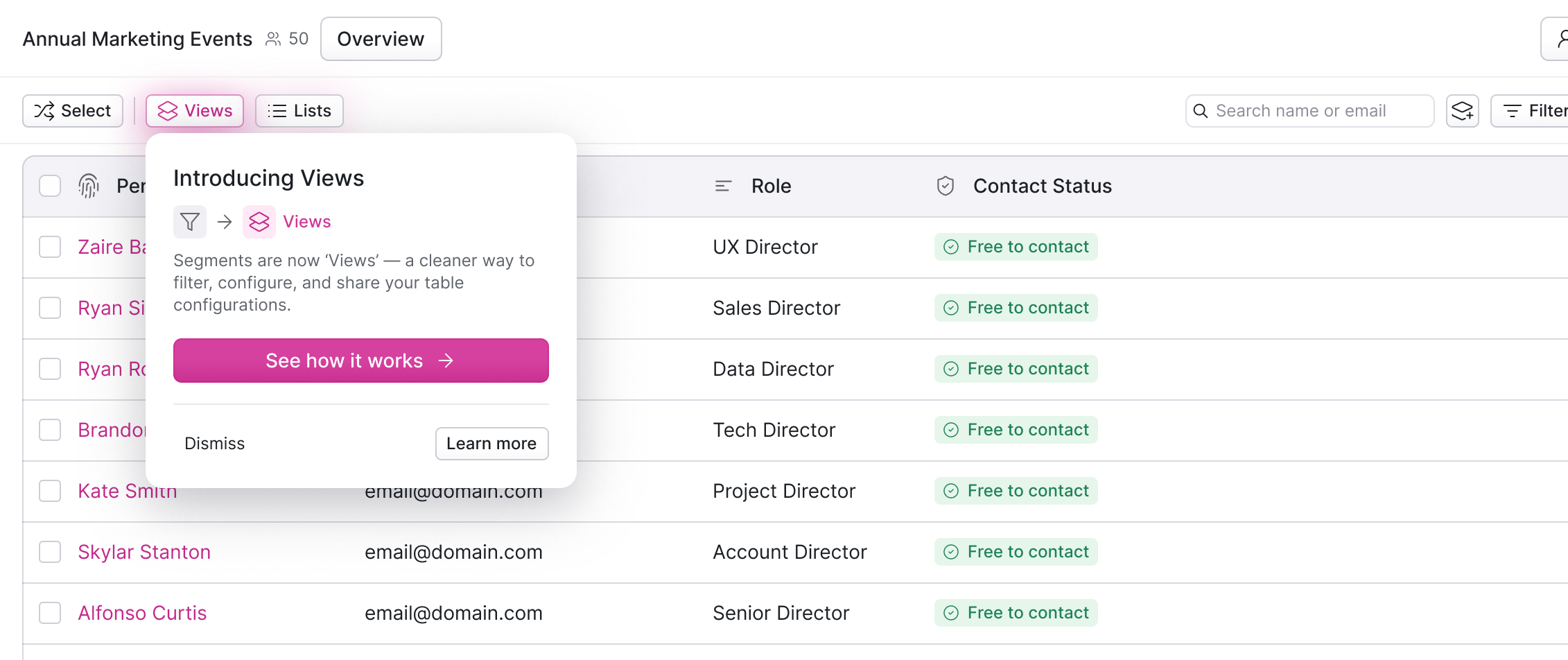
If you've used Rally for a while, you've most likely used Segments. Segments let you save a set of filters on a population so you can return to them later.
Views, now available in Rally populations, are a rework of this concept; and along with it comes better visibility into what's filtering a table, enhanced filter interactions and a streamlined table control bar. What may seem like a simple reorientation is actually a key component of Rally's evolution as we push towards making recruitment easier than ever.
What's a view?
Views kicked off in November 2025 with a question the team couldn't pin down the answer to: what do we want a "view" to actually contain? Depending on who you asked, it could reasonably mean several things: the arrangement of columns on a table, the filters applied to a population, the specific group of people surfaced by those filters, or some combination of the three. Our core goal for views was to enable our users the flexibility to arrange their data how they want to see it depending on what they're trying to do.
Many great products have a concept like "views," most notably, Linear, who, in my mind at least, pioneered the transformation of the humble release of "views" in 2020, into a dynamic, powerful, and product-defining feature. At the center of what complicated this question for our team was that Rally has many different contexts in which a view needs to be applicable: populations, participants in a study, screener responses, incentives. Each one is anchored on a different object, surfaces a different set of properties, follows different access rules, and exists to support a different user need. A View on a population is anchored on people, with criteria that surface different members of your pool as the data underneath shifts. A View on screener responses is anchored on the submissions to a single study, where the relevant properties are the questions you just asked. Different anchors, different shapes, different jobs to do. Designing one feature that fits all of them coherently was the real puzzle.
Rather than shipping something partial and anchored on a short-term need, the team paused the build and sent the project back to design. The instruction was straightforward: figure out what a View actually is before any more of it gets built. I had just joined Rally around this time and seeing a product with fresh eyes felt like a small advantage and the most productive time to ask whether the existing logic should remain the logic at all.
The answer that emerged was a unification: a single primitive, designed to flex across the contexts of our app and beyond.
The Decisions That Shaped the Experience
And as these projects usually go: that single decision opened up a sequence of smaller ones, each shaping how Views actually feels to use day-to-day. The work that followed was less about the new concept of Views and more about establishing a systematic foundation for how Rally presents filtered data back to a user.
The first was about visibility. Previously, knowing which filters were active on a table meant opening the filter menu to check. We wanted that information surfaced directly on the table itself, through a row of chips below the utility bar. Each chip now represents an active filter, and removing one lifts that filter without touching the others. When a View is applied, filters that belong to that view show up as a chip and can sit alongside any additional filters layered on top, so the line between what filters make up a view and what's been added on top of it stays visible at a glance.
The second was about immediacy. Adjusting a filter used to mean leaving the table, opening a menu, locating the filter, making the change, closing the menu, and re-orienting. Inline editing collapses that sequence. Clicking a chip opens the filter editor in place, directly over the table you're looking at. It's a small interaction, but removes a surprising amount of context-switching from the work of refining a query.
One of the tougher parts of this project was defining the scope. Not because we didn't know what was going to move the needle the most, but mainly because of how impactful Views could be across many Rally surfaces. For example, Rally currently auto-saves table changes (meaning we allow users to filter/change columns, navigate away from a table and return back to those same filters), a behavior that seemed helpful until customer feedback made clear it was one of the more consistent sources of confusion. As one researcher we spoke with put it: "To be honest, I don't know that I've ever fully understood that save button — when you put on filters and you put on that save button. I think sometimes when I come back, it's the same."
Auto-save blurred the line between exploring a dataset and committing to a configuration as something reusable (an accidental back-door to saving). While auto-saving touches the experience of the Views work, we chose to package that work and push it to a later release.

Removing auto-save would have meant users in a 'pending' save state would have to commit or discard their unsaved changes in the new model.
Another item we made tradeoffs on regarding scope involved Views within the study context. Views provide value at the population-level as a way to further divvy up and organize larger pools of people (a population of beta participants can be viewed by different product offerings or demographics), but views within a study-level context unlock a different type of value. Within studies, Views can help a person in research-mode organize their participants at each stage of a study, rather than the population it drew from. Each study/participant stage now carries its own view, so the filters and columns you see while inviting people aren't the same ones you see while shepherding the ones who said yes through to study completion. While Views V1 doesn't include the creation of views within a study context, the independent study phases address a key customer need and allow us to iterate on the views release until it's in scope.
Views Under Pressure
Views shipped in the same month as Rally's MCP server. The two releases began interacting almost immediately, and the shape of that interaction is the clearest answer to why we rethought Views in the first place.
Through April, customers began connecting Rally to tools like Claude and Cursor and querying their participant pools in plain language. Some had already linked the rest of their research stack through their own MCP integrations and were treating Rally as the missing piece. Others described a vision in which an agent identifies a research question, generates a list of candidates, and coordinates scheduling end-to-end. Research that used to be set up by a ReOps specialist is increasingly being initiated by a product manager or designer in the middle of another workflow entirely.
Internally, that shift is shaping what we're building next. New MCP tools in progress will let agents narrow down a group of participants in plain language, and a key piece of how they work is already settled: under the hood, they lean on the same Views primitive a human would use in the app. The lens we built for the table doesn't get replaced when an agent enters the picture. It gets reused as extra context.
The themes from customer conversations were remarkably consistent. Teams with large customer pools worried about uncoordinated outreach exhausting them. Teams with open research cultures wanted the agent to flag bad inputs: a 3,000-invite send that was meant to be 300, an incentive figure that didn't match the scope of the study. And nearly every team said some version of the same thing: the agent has to be trustworthy before it can be useful.
These concerns give Views a second purpose, one that wasn't obvious at the start of the project. An agent acting on a participant pool needs stable, well-defined lenses to work against, lenses that a human has already sanity-checked, named, and approved. A View called "APAC enterprise users who have opted into research and haven't been contacted in 90 days" is no longer just a filter, but a control surface. When an agent operates against it, the constraints are already established.
Looking Ahead
Views aren't a reinvention of how Rally works, but a rework of one of our oldest primitives that's shaped by how the product is being used today and where we're taking it next. Most of what makes Views useful is drawn directly from what was already there: filters, columns, shared access, Segments. What's new is how those pieces fit together, and the order in which a user can decide to commit to them.
The test for anything we ship in a moment like this one isn't whether it solves a problem today. It's whether it will still make sense when the landscape around it has shifted. Views are our first attempt at meeting that test, built with an eye on where Rally is heading and shaped by the constraints of where it already is.
Rally’s Research Ops Platform enables you to do better research in less time. Find out how you can use Rally to empower your teams to talk to their users, without disjointed tooling and spreadsheets. Explore Rally now by setting up a demo.